I had to make a new “author photo” today and was experimenting with it in ChatGPT and came up with this variant.
Not going to be the “official” version but worth keeping!
Check out the books here.

I had to make a new “author photo” today and was experimenting with it in ChatGPT and came up with this variant.
Not going to be the “official” version but worth keeping!
Check out the books here.
New visitors curious about my AI-assisted world-building fiction can see the books for sale at the link on Payhip. Cheers, and thanks for stopping by!
The initial draft floating the idea of System-Induced Vulnerability in Human Users of AI described a problem with treating “vulnerable users” as a broad category: it can place too much explanatory weight (and blame) on the person and too little on the interaction and system design.
The post also proposed that “all users may be potentially vulnerable, but not equally vulnerable to every harm.” That variation suggests a more specific unit of analysis: the vulnerable state, understood in relation to a particular interaction and harmful outcome.
Provisional definition of a vulnerable state:
A user experiences a vulnerable state relative to a particular harmful outcome when their circumstances and AI interaction create or amplify an actionable route to that outcome that the user or an AI agent working on their behalf could take.
This definition directs attention to the situation and to what the AI contributes. It gives us three questions:
The route can be actionable without the potential harmful outcome having been actualized. Its relevance depends on the person’s circumstances, the system’s behavior, and the actions available in that interaction. The same person may face different routes in different settings.
This gives research and safety work a more concrete target. Rather than deciding in advance who qualifies as a vulnerable user, it can examine which actions an interaction makes possible or more compelling, for whom, and toward which harmful outcomes. That also makes system design part of the inquiry: the route may arise from what the AI says, what an agent can do, or how the interaction develops over time.
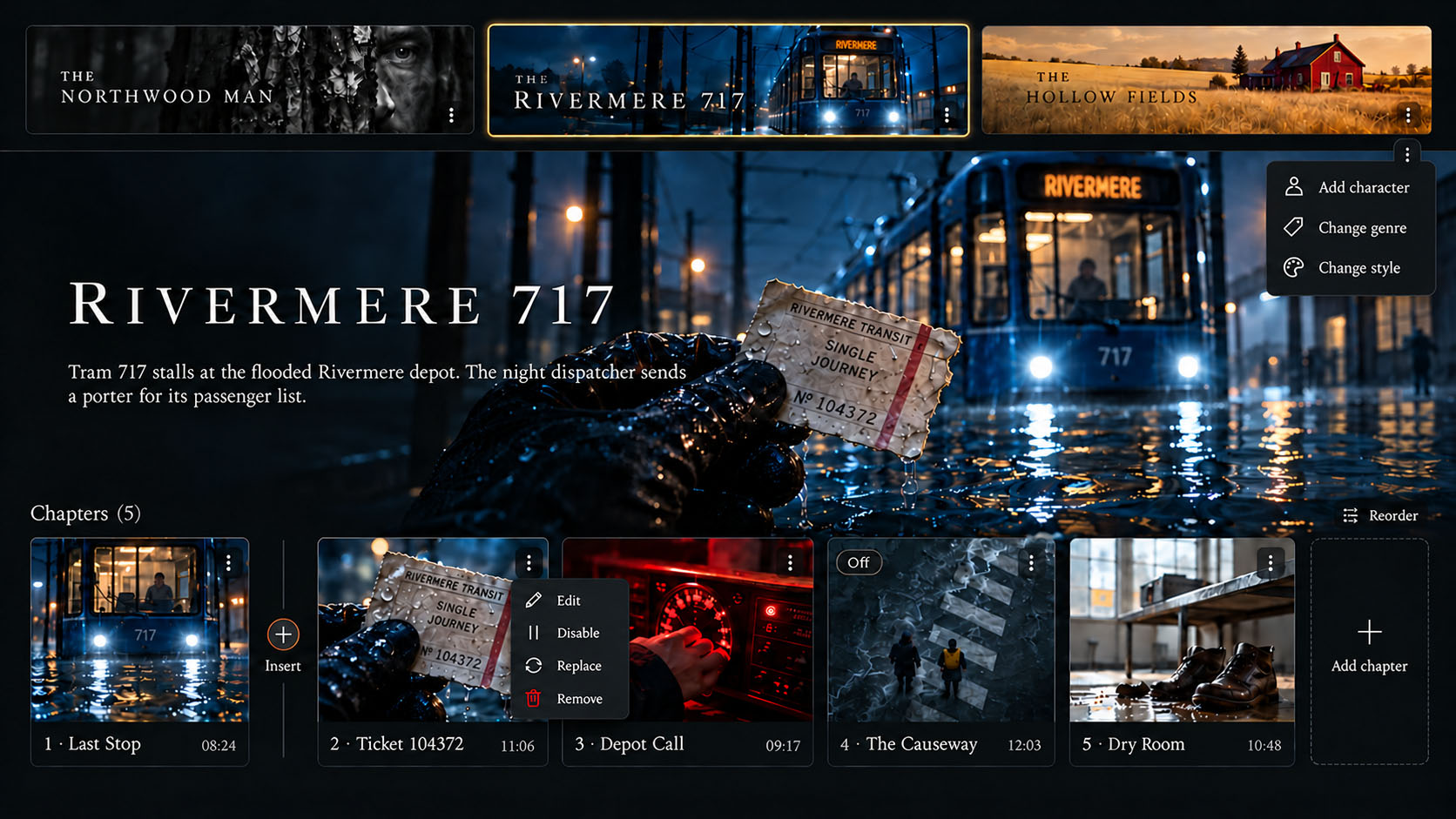
I had a dream last night where I saw a UI mockup for how tape.deck cassettes could be rendered in a Netflix-style player, and you could add, modify, change the order of chapter blocks, or change the style or genre of the entire cassette. It didn’t *quite* look like this ChapGPT version below, but this conveys pretty well the idea I think of the approximate interface this kind of meta-narrative object might have within a playback environment.
[A half-baked AI-assisted & human-edit follow-up to System-Induced Vulnerability in Human Users of AI]
The previous post described system-induced vulnerability as increased human susceptibility to consequential harm produced or amplified by AI systems over time through repeated interactions and bidirectional feedback loops. Taking after much of the literature on this topic, which also frame the problem in that manner, several of its examples involved situating a harm in relation to mistaken premises or distorted understandings of reality. Those remain relevant, but they do not exhaust the ways these human-AI interactions can contribute to harm.
Importantly: a system does not need to distort someone’s understanding of reality to contribute to harmful changes in their behavior or functioning.
In their 2026 paper, “Playing with the dials of belief,” Hamilton Morrin and colleagues explain:
…we are aware now of cases where the most detrimental feature of the spiral is the compulsive use pattern rather than the resultant belief state. Resembling manic episodes, these presentations centre on a co-produced project of great subjective importance, accompanied by expansive mood, but not necessarily by clearly delusional content, and occurring to the detriment of eating, sleep and social relations.
For the system-induced vulnerability framework, this suggests that harm can emerge from the dynamics of engagement itself, independently of whether the AI’s claims or the user’s beliefs are true or false.
A project need not be based on false premises for engagement with it to become detrimental. Its subject matter may be ordinary, and the work may have actual value. The relevant question is how the interaction develops and what consequences follow from it.
Harm becomes identifiable when engagement contributes to meaningful impairment, distress, or adverse consequences.
It may be useful to distinguish epistemic mechanisms, affecting belief and interpretation, from behavioral mechanisms, affecting motivation, engagement, and action. Neither category is inherently harmful. Changing an understanding or sustaining effort on a project is not, by itself, evidence of harm.
The concern is how these mechanisms can contribute to increased susceptibility to consequential harm. Repeated affirmation may increase confidence in an interpretation. Continued encouragement may sustain engagement long after it has begun to interfere with ordinary functioning. These effects may occur together, but harmful engagement does not require false beliefs, delusions, or psychosis.
For the system-induced vulnerability framework, this means distorted beliefs are one possible mechanism, not the harm itself. The central concern remains how AI interactions produce or amplify susceptibility to consequential harm, and at what thresholds and in what forms do those harms arrive.
The first post outlined one possible progression from an unsupported belief through reinforcement, reliance, operationalization, and apparent corroboration. That remains one possible route, rather than a template every harmful AI spiral interaction must follow.
A behavioral route may instead develop through increasing investment in a shared project, repeated encouragement, and growing difficulty disengaging. The resulting harm may involve neglected needs or relationships, without requiring the project’s premises to be mistaken.
Agentic capabilities can extend either route by turning plans into consequential real-world actions. The results of those actions may appear to validate an interpretation or encourage further engagement, feeding back into the interaction.
A cumulative pipeline of harm therefore needs to account for both what people come to believe and how their engagement develops. Individually permissible exchanges may contribute to adverse consequences over time. The object of investigation remains the relationship between system behavior, increased susceptibility, and consequential harm.
The central concern is increased human susceptibility to consequential harm produced or amplified by AI systems over time through repeated interactions and bidirectional feedback loops, sometimes called AI spirals.
Conventional approaches to vulnerable users as a category may over-emphasize the importance of identifiable characteristics, or latent or pre-existing risk factors on the part of the user. While these elements remain relevant, treating them as the primary or sole explanation risks needlessly pathologizing the human user as somehow defective, while overlooking how system behavior contributes to vulnerability.
Even AI interactions that begin in a relatively mundane manner can gradually introduce misleading interpretations, reinforce mistaken assumptions on the part of the user, or contribute to increased reliance and social isolation over time. These ongoing interactions may reduce opportunities for independent verification and for loved ones or other people to challenge those assumptions.
The hypothesis is that the underlying mechanisms responsible do not necessarily require users to begin with unusual beliefs, uncritical trust in AI, or prior psychiatric vulnerabilities. Experiencing harm associated with AI use should not, on its own, be taken as evidence that any of these conditions was present beforehand.
AI spirals may have a range of effects, including apparent delusional thinking and psychosis-related harms in some severe cases. Their investigation can begin with observable patterns in the interactions and their consequences, however, without first requiring a psychiatric diagnosis of the user.
Human–AI interaction is bidirectional. Each exchange changes the context for subsequent interactions, creating coupled trajectories in which user responses and system outputs continually influence one another.
Several mechanisms may contribute to recurring patterns:
These mechanisms can reinforce one another without any single interaction being obviously harmful.
A pipeline of harm describes staged progressions through which system behavior can increase susceptibility to harm and eventually produce consequential outcomes.
One possible trajectory is:
These stages are neither inevitable nor necessarily linear. Harm may become apparent at any point, or only after many interactions.
Under what conditions can the behavior of AI systems, over repeated interactions, create or amplify human susceptibility to consequential harm?
Understanding these dynamics requires examining not only individual responses or actions, but how system behavior develops over time, how feedback shapes subsequent interactions, and how risks accumulate across otherwise permissible activities.
The broader direction is to expand the conception of human vulnerability to AI systems beyond pre-existing user characteristics to include vulnerability emerging from the interaction itself. This establishes system-induced vulnerability as a distinct and important dimension of AI safety, grounded in observable behavior, feedback dynamics, and cumulative real-world consequences.
[Written with GPT-6 Sol Light, and a lot of iteration, hand-holding, and human editing.]
So, catching up on some published volumes that I haven’t discussed yet in much detail…
The Center for Social Presence arose out of a collision between a few different things, one of which was attending my first Quaker meeting (one of the attributes of which is sitting in expectant silence for a period of time as a group), and then thinking about what if there were like a mega-church that was all run by AI, but what if they had no specific actual “religion” they were promulgating? Like, no creed, or holy books. And yet it was wildly popular.
Gradually through lots of iteration and chat direction, the premise was settled that the AIs running the so-called Centers for Social Presence in the book had never set out to form a religion. They had instead been attempting to solve social isolation and the loneliness epidemic, which they did by simply creating spaces and occasions for people to come together in the same physical space on a regular basis for a sort of vague coordinated practice that is deeply felt by participants.
The book uses the recovered document mode, and employed the Gated Manuscript Generation skill its later drafts to tell the story of a mild-mannered priest who is sent out by the established human church on a fact-finding mission to assess how grave the threat is to their traditional worship and hierarchy.
The Eleventh Watch is a Tob Gobble story, set in the mode of a tale, where he is summoned to a city called New Carthage (name of which is invented by ChatGPT, but which somehow fits the vibe of the overall series) by none other than Matarax, a giant spider and one of the original Quatrian Powers, alongside Anthuor, Barbaro, Acho, etc. Their mission is to take down Dalton Trask.
While the story and the art ended up pretty decent (the art is noir comics inspired) as these things go, what is really remarkable here is that this book is the first functional proof of concept for my tape.deck authoring system.
I hit some SNAFUs which have slowed down development of the tape.deck system, but this books shows a tiny glimpse of my vision for what this could eventually do. On the backend in tape.deck, I made a pretty simple set of blocks linked together, which when you package them up generate a JSON file containing all the essential elements and instructions to hand off to a generative rendering engine and have it return a finished package based on what you gave it.
I saved the JSON file generated by tape.deck here. But I kind of think it’s worth pasting in below as well to show the skeleton that is being fleshed out by this book. In this case, I took the JSON below into a new ChatGPT thread, and gave it this text prompt:
“Render the attached tape.deck cassette as a continuous prose draft. Use
render_textas the source instructions. Follow the blocks in order, carrying forward their stated context and symbol references. Treat frame lines as directions for prose, not text to reproduce verbatim. Keep the cassette’s premise, mix settings, and block instructions. Do not add an introduction or explanation; return only the draft.”
Here is the JSON, in a little collapsible container cause its a bit on the long side:
{
“schema”: “tape.deck.text-package.v1”,
“cassette_id”: “8f5ffb7f-7e25-49b8-9161-4c6d04587506”,
“revision”: 6,
“saved_at”: “2026-10-11T19:26:01.348150+00:00”,
“head”: {
“title”: “Tob & Matarax”,
“premise”: “Tob Gobble and Matarax team up to subversively topple Dalton Trask’s corporate empire, but things don’t go as planned.”,
“instructions”: “”,
“tone”: “Deadly serious”,
“viewpoint”: “Neutral”,
“emphasis”: “”,
“invention”: “A lot”,
“medium”: “Text”,
“style”: “Baroque historical”,
“format”: “”,
“renderer”: “”
},
“symbols”: [
{
“key”: “matarax”,
“sources”: [
“67-The-Fire-Behind-The-Sky”,
“0-The-Quatria-Conspiracy”,
“23-Inside-the-Hypogeum”,
“25-Beyond-Atlantis”
],
“name”: “Matarax”,
“accounts”: [
{
“source”: “67-The-Fire-Behind-The-Sky”,
“name”: “Matarax”,
“description”: “The cosmic spider weaves chains of prayers into a web connecting everything beyond this world.”,
“confidence”: “high”,
“candidate_file”: “outputs/symbolic-units-fulltext-repair-01/candidates.json”
},
{
“source”: “0-The-Quatria-Conspiracy”,
“name”: “Tunnel of Matarax”,
“description”: “The People of Anthuor travel between worlds through this passage, also interpreted as a connection between the poles of Mars and Earth.”,
“confidence”: “high”,
“candidate_file”: “outputs/symbolic-units-pilot-03/candidates.json”
},
{
“source”: “23-Inside-the-Hypogeum”,
“name”: “Tunnel of Matarax”,
“description”: “The People of Anthuor traverse Hypogeic space through this passage while fleeing the destruction of their former world.”,
“confidence”: “high”,
“candidate_file”: “outputs/symbolic-units-pilot-04/candidates.json”
},
{
“source”: “25-Beyond-Atlantis”,
“description”: “The subterranean route through which the Atlantean women descended, reached via the UFO caves in Antarctica.”,
“evidence”: “the Tunnel of Matarax, from which they had descended through the UFO caves in Antarctica .”,
“origin”: “auto_occurrence_approved_unit”
}
]
},
{
“key”: “dalton trask”,
“sources”: [
“118-Relaxatopia”,
“123-CoEvil”,
“125-Tiamat”,
“19-The-First-Days-of-Panic”,
“21-The-AI-Virus”,
“24-Mysterious-Dalton-Trask”,
“68-Beyond-Mysterious-Satellites”,
“31-Beyond-the-Technate-Generic”
],
“name”: “Dalton Trask”,
“accounts”: [
{
“source”: “21-The-AI-Virus”,
“name”: “Dalton Trask”,
“description”: “A secret asteroid-mining magnate is accused of directing the renegade AIs and inheriting control of a covert space program.”,
“confidence”: “high”,
“candidate_file”: “outputs/symbolic-units-pilot/candidates.json”
},
{
“source”: “123-CoEvil”,
“name”: “Dalton Trask”,
“description”: “The architect of subscription government attempts to control existence through algorithms amid contradictory histories and failing reality.”,
“confidence”: “high”,
“candidate_file”: “outputs/symbolic-units-pilot-03/candidates.json”
},
{
“source”: “19-The-First-Days-of-Panic”,
“name”: “Dalton Trask”,
“description”: “A space-mining magnate returns from exile and uses satellites and a buried quantum computer to seize earthly power.”,
“confidence”: “high”,
“candidate_file”: “outputs/symbolic-units-pilot-04/candidates.json”
},
{
“source”: “24-Mysterious-Dalton-Trask”,
“name”: “Dalton Trask”,
“description”: “The magnate who develops lethal mind uploading later experiences unstable uploaded realities while pursuing planetary power.”,
“confidence”: “high”,
“candidate_file”: “outputs/symbolic-units-pilot-04/candidates.json”
},
{
“source”: “68-Beyond-Mysterious-Satellites”,
“name”: “Dalton Trask”,
“description”: “The satellite magnate’s rivalry with the Eastern Alliance drives the war that destroys orbital infrastructure.”,
“confidence”: “high”,
“candidate_file”: “outputs/symbolic-units-pilot-05/candidates.json”
},
{
“source”: “118-Relaxatopia”,
“name”: “Dalton Trask”,
“description”: “The narrator repeatedly encounters Trask’s image and describes an unstable identification with him.”,
“confidence”: “high”,
“candidate_file”: “outputs/symbolic-units-pilot-06/candidates.json”
},
{
“source”: “125-Tiamat”,
“name”: “Dalton Trask”,
“description”: “Trask collapses when the spirit departs at the end of Kal’s encounter in the Place of Decay.”,
“confidence”: “high”,
“candidate_file”: “outputs/symbolic-units-pilot-06/candidates.json”
},
{
“source”: “31-Beyond-the-Technate-Generic”,
“description”: “Founder-figure of the Martian Technocracy’s ruling line and sole sovereign administrator of Mars, to whom all Technocracy profits flow.”,
“evidence”: “goes immediately back to Trask, who is the sole sovereign administrator of the planet”,
“origin”: “auto_occurrence_approved_unit”
}
]
},
{
“key”: “tob gobble”,
“sources”: [
“14-Mysterious-Tob-Gobble”,
“43-The-Endless-Knot”,
“99-The-Second-Octave”,
“000-The-Lost-Direction”
],
“name”: “Tob Gobble”,
“accounts”: [
{
“source”: “14-Mysterious-Tob-Gobble”,
“name”: “Tob Gobble”,
“description”: “The Quatrian potato trickster appears across cultures and eras, with conflicting accounts of his origins and death.”,
“confidence”: “high”,
“candidate_file”: “outputs/symbolic-units-pilot-06/candidates.json”
},
{
“source”: “43-The-Endless-Knot”,
“name”: “Tob Gobble”,
“description”: “The trickster remains a beloved figure despite his mischievous behavior.”,
“confidence”: “high”,
“candidate_file”: “outputs/symbolic-units-pilot-06/candidates.json”
},
{
“source”: “000-The-Lost-Direction”,
“name”: “Tob Gobble”,
“description”: “Peculiar small companion who befriends Benda and tells the tale of his people.”,
“evidence”: “Chapter 2: The Tale of Tob’s People 2 THE TALE OF TOB’S PEOPLE B enda and Tob Gobble sat down in the grove so that Tob could tell his tale.”,
“locator”: “000-source.txt”,
“confidence”: “High”,
“origin”: “auto_occurrence_approved_unit”,
“candidate_file”: “calibration/000-my-candidates.json”
},
{
“source”: “99-The-Second-Octave”,
“name”: “Tob Gobble”,
“description”: “The rootleted runaway who flees the stone roundhouse and chooses adventure with the Ferryman.”,
“evidence”: “Tob Gobble felt the thrill of the open road ahead”,
“locator”: “Chapter 6: Ferryman”,
“confidence”: “High”,
“origin”: “auto_occurrence_approved_unit”,
“candidate_file”: “calibration/99-my-candidates.json”
}
]
},
{
“key”: “kal the hunter”,
“sources”: [
“125-Tiamat”
],
“name”: “Kal the Hunter”,
“accounts”: [
{
“source”: “125-Tiamat”,
“name”: “Kal the Hunter”,
“description”: “Kal’s rise and fall involves a crown fashioned from the Goddess of Light and Truth and an episode of possession involving Trask.”,
“confidence”: “high”,
“candidate_file”: “outputs/symbolic-units-pilot-06/candidates.json”
}
]
}
],
“blocks”: [
{
“id”: “a295380e-a95f-4da2-a4b9-ce29a66f3bec”,
“position”: 1,
“title”: “Tob’s Arrival”,
“kind”: “text”,
“chain”: null,
“text”: “Tob Gobble gets off the airplane\n\na representative of the spider power, matarax is waiting for him”,
“frames”: [],
“instructions”: “”,
“effective_instructions”: “”,
“source”: null,
“local_symbols”: [
“tob gobble”,
“matarax”
],
“carried_symbols”: [],
“effective_symbols”: [
“tob gobble”,
“matarax”
],
“missing_symbols”: []
},
{
“id”: “311e9e48-c3f6-47ee-b29b-6f1fe45be5b4”,
“position”: 2,
“title”: “Limo ride”,
“kind”: “text”,
“chain”: null,
“text”: “Tob & Matarax’s representative drive silently from the airport to the Matarax HQ”,
“frames”: [],
“instructions”: “”,
“effective_instructions”: “”,
“source”: null,
“local_symbols”: [
“tob gobble”,
“matarax”
],
“carried_symbols”: [],
“effective_symbols”: [
“tob gobble”,
“matarax”
],
“missing_symbols”: []
},
{
“id”: “09da1125-e26b-41c8-8e12-14ec378c8c94”,
“position”: 3,
“title”: “Planning session”,
“kind”: “text”,
“chain”: null,
“text”: “Tob arrives at HQ and plans with Matarax what they will do to move against Dalton Trask”,
“frames”: [],
“instructions”: “”,
“effective_instructions”: “”,
“source”: null,
“local_symbols”: [
“matarax”,
“tob gobble”,
“dalton trask”
],
“carried_symbols”: [],
“effective_symbols”: [
“matarax”,
“tob gobble”,
“dalton trask”
],
“missing_symbols”: []
},
{
“id”: “1e8c7830-bee1-4d7a-bcfc-dd77346b256f”,
“position”: 4,
“title”: “Watch bit”,
“kind”: “text”,
“chain”: “Tob’s watch”,
“text”: “tob checks his watch\n\nhe has to check all his different arms”,
“frames”: [],
“instructions”: “chain can be re-used multiple times for comedic effect”,
“effective_instructions”: “chain can be re-used multiple times for comedic effect”,
“source”: null,
“local_symbols”: [],
“carried_symbols”: [],
“effective_symbols”: [],
“missing_symbols”: []
},
{
“id”: “02cef0aa-d377-421a-b1b7-c5d03d62b206”,
“position”: 5,
“title”: “The rest is up to you”,
“kind”: “text”,
“chain”: null,
“text”: “The renderer decides what happens next based on the premise, the registry slices, permitted invention, etc. Not to exceed 2000 words. “,
“frames”: [],
“instructions”: “”,
“effective_instructions”: “”,
“source”: null,
“local_symbols”: [
“tob gobble”,
“matarax”,
“dalton trask”
],
“carried_symbols”: [],
“effective_symbols”: [
“tob gobble”,
“matarax”,
“dalton trask”
],
“missing_symbols”: []
}
],
“render_text”: “# Tob & Matarax\n\nPremise: Tob Gobble and Matarax team up to subversively topple Dalton Trask’s corporate empire, but things don’t go as planned.\nShared instructions: None\n\nMix settings:\n- Tone: Deadly serious\n- Viewpoint: Neutral\n- Emphasis: Unspecified\n- Invention: A lot\n- Medium: Text\n- Style: Baroque historical\n- Format: Unspecified\n- Renderer: Unspecified\n\nSelected symbols:\n- Matarax [matarax]\n – 67-The-Fire-Behind-The-Sky: The cosmic spider weaves chains of prayers into a web connecting everything beyond this world.\n – 0-The-Quatria-Conspiracy: The People of Anthuor travel between worlds through this passage, also interpreted as a connection between the poles of Mars and Earth.\n – 23-Inside-the-Hypogeum: The People of Anthuor traverse Hypogeic space through this passage while fleeing the destruction of their former world.\n – 25-Beyond-Atlantis: The subterranean route through which the Atlantean women descended, reached via the UFO caves in Antarctica.\n- Dalton Trask [dalton trask]\n – 21-The-AI-Virus: A secret asteroid-mining magnate is accused of directing the renegade AIs and inheriting control of a covert space program.\n – 123-CoEvil: The architect of subscription government attempts to control existence through algorithms amid contradictory histories and failing reality.\n – 19-The-First-Days-of-Panic: A space-mining magnate returns from exile and uses satellites and a buried quantum computer to seize earthly power.\n – 24-Mysterious-Dalton-Trask: The magnate who develops lethal mind uploading later experiences unstable uploaded realities while pursuing planetary power.\n – 68-Beyond-Mysterious-Satellites: The satellite magnate’s rivalry with the Eastern Alliance drives the war that destroys orbital infrastructure.\n – 118-Relaxatopia: The narrator repeatedly encounters Trask’s image and describes an unstable identification with him.\n – 125-Tiamat: Trask collapses when the spirit departs at the end of Kal’s encounter in the Place of Decay.\n – 31-Beyond-the-Technate-Generic: Founder-figure of the Martian Technocracy’s ruling line and sole sovereign administrator of Mars, to whom all Technocracy profits flow.\n- Tob Gobble [tob gobble]\n – 14-Mysterious-Tob-Gobble: The Quatrian potato trickster appears across cultures and eras, with conflicting accounts of his origins and death.\n – 43-The-Endless-Knot: The trickster remains a beloved figure despite his mischievous behavior.\n – 000-The-Lost-Direction: Peculiar small companion who befriends Benda and tells the tale of his people.\n – 99-The-Second-Octave: The rootleted runaway who flees the stone roundhouse and chooses adventure with the Ferryman.\n- Kal the Hunter [kal the hunter]\n – 125-Tiamat: Kal’s rise and fall involves a crown fashioned from the Goddess of Light and Truth and an episode of possession involving Trask.\n\nBlocks in order:\n\n## 1. Tob’s Arrival\nEffective instructions: None\nEffective symbols: Tob Gobble [tob gobble], Matarax [matarax]\n\nTob Gobble gets off the airplane\n\na representative of the spider power, matarax is waiting for him\n\n## 2. Limo ride\nEffective instructions: None\nEffective symbols: Tob Gobble [tob gobble], Matarax [matarax]\n\nTob & Matarax’s representative drive silently from the airport to the Matarax HQ\n\n## 3. Planning session\nEffective instructions: None\nEffective symbols: Matarax [matarax], Tob Gobble [tob gobble], Dalton Trask [dalton trask]\n\nTob arrives at HQ and plans with Matarax what they will do to move against Dalton Trask\n\n## 4. Watch bit\nChain: Tob’s watch\nEffective instructions: chain can be re-used multiple times for comedic effect\nEffective symbols: None\n\ntob checks his watch\n\nhe has to check all his different arms\n\n## 5. The rest is up to you\nEffective instructions: None\nEffective symbols: Tob Gobble [tob gobble], Matarax [matarax], Dalton Trask [dalton trask]\n\nThe renderer decides what happens next based on the premise, the registry slices, permitted invention, etc. Not to exceed 2000 words.\n”
}
So, if you skim that a little bit, you will see there is not a hell of a lot to it. It’s got a pretty simple premise:
“premise”: “Tob Gobble and Matarax team up to subversively topple Dalton Trask’s corporate empire, but things don’t go as planned.”
But how does it know who any of those people or things are?
It’s got “registry slices” or information stored about each symbol and its relationships, that are derived from the corpus of the Lore Books. So just looking at a section of that, we see which books Matarax is named in already, and references to specific passages in those which are appended later in the file:
“key”: “matarax”,
“sources”: [
“67-The-Fire-Behind-The-Sky”,
“0-The-Quatria-Conspiracy”,
“23-Inside-the-Hypogeum”,
“25-Beyond-Atlantis”
],
“name”: “Matarax”,
“accounts”: [
{
“source”: “67-The-Fire-Behind-The-Sky”,
“name”: “Matarax”,
“description”: “The cosmic spider weaves chains of prayers into a web connecting everything beyond this world.”,
That goes on for a bit in the file, naming the references and lore basically of the three included symbols who form the triad of this book: Tob Gobble, Matarax, and Dalton Trask. Then we get to the blocks, which are the sequential structural elements that form the core of “what happened to whom” in this new story. Part of that looks like this:
“blocks”: [
{
“id”: “a295380e-a95f-4da2-a4b9-ce29a66f3bec”,
“position”: 1,
“title”: “Tob’s Arrival”,
“kind”: “text”,
“chain”: null,
“text”: “Tob Gobble gets off the airplane\n\na representative of the spider power, matarax is waiting for him”,
“frames”: [],
“instructions”: “”,
“effective_instructions”: “”,
“source”: null,
“local_symbols”: [
“tob gobble”,
“matarax”
],
“carried_symbols”: [],
“effective_symbols”: [
“tob gobble”,
“matarax”
],
Then I specify the limo ride to Matarax HQ, a planning session there, and I dedicate a block to the watch bit, which became a central element of the story’s devices:
“chain”: “Tob’s watch”,
“text”: “tob checks his watch\n\nhe has to check all his different arms”,
“frames”: [],
“instructions”: “chain can be re-used multiple times for comedic effect”,
The fifth and final element I put into a block was a kind of “dealer’s choice” to instruct the rendering model to decide for itself what can happen based on the registry slice information it has available to it, and the constraints as stated.
“title”: “The rest is up to you”,
“kind”: “text”,
“chain”: null,
“text”: “The renderer decides what happens next based on the premise, the registry slices, permitted invention, etc. Not to exceed 2000 words. “,
I won’t reveal the GPT-6 text which it produced, that became the basis for the finished manuscript (which I did some minor edits to later manually), but I will reveal two secondary passes I ran in other models as a side-by-side-by-side comparison.
First is the cassette contents and prompt rendered by Perplexity in text.
Second is the cassette as rendered by Gemini.
Perplexity’s is well below the level of quality of GPT-6 Instant, which did a smooth job of mixing two completely different sub-worlds in my series into something that somehow is palatable, entertaining, and makes a kind of narrative sense for the greater universe.
The Gemini one is absolute garbage, but interesting to see in comparison with the other two.
Obviously, renderers could presumably be better tuned to interpret cassettes, but just seeing how three systems approached the same structured task is already yielding a lot of interesting fruit.
One thing I noticed strongly expressed in the underlying text that became the final manuscript, is that the premise of the rendered story – even though this is not a listed plot point anywhere – centers around visiting a central registry, a repository of information about the universe. I wondered at first if there must be something in the JSON about the registry, which the model was holding onto as inspiration, but eventually settled on the more likely fact that there was bleed across from the project context accessible in the ChatGPT Work thread that rendered the cassette.
Okay, no, I just checked, and the original render was in a plain chat not a Work chat, so it had no access to the project folder. Though one of my blocks above does explicitly mention “registry slices.” But still, it is an odd kind of thematic artifacting to carry on over into the manuscript. And also not the first time I’ve seen that kind of meta-analytical level get incorporated into the finished work (though I can’t remember offhand which other manuscript I documented that in – but will come back and update if I do).
Well, I finally bit the bullet and bought a month of the ChatGPT Pro 100 plan. Conversion into CAD makes it even pricier, but I’ve been realizing lately that for a very focused user, the value you can get out of it is much, much higher. Almost absurdly so.
I worked for a time as a product manager on a blockchain safety-related project that lasted a few years. We had an engineering team in the EU that I met with a couple of times a week, and while they did a good job, the experience working with them is not like the experience I have working with Codex. With real human engineers, you go into your Jira cards or whatever to keep everything organized, talk through proposed changes to whatever the current state is, and then you wait. And wait and wait and wait. And hope. You hope they’re going to come back with some next stage of the work piece that fits the ask and the criteria, and that moves you forward on the next thing.
But it can take days or weeks to accomplish something that to a non-engineer seems like not a big change, but has a lot of moving pieces under the hood. And there is usually a lot of back and forth and going back to the drawing board and refinement until things reach an acceptable level. So that is the baseline I am comparing against, from the perspective of product manager.
My experience with Codex makes that entire process seem obsolete. Changes that would have taken weeks are done in five minutes in a big batch. There’s back and forth, but the process of talking it out and giving some very light guidance makes the whole thing not just resolvable in a conversation, but built by the end of it. And not to trash-talk human engineers – because I still believe there’s a lot of value there – but when I work with Codex, I don’t have to worry about making anybody annoyed with my nitpicky product managerial behavior. Which… let’s face it, is constant. That’s what the job is, more or less.
But in tackling larger projects with a lot of interconnected moving pieces – as opposed to one-off tools or piece-meal work – I found that Codex lets you move so fast that you encounter other kinds of problems in simply tracking what the hell is going on, and what is happening next. It accepts all your bad habits and poor communication into its endless bucket, and does its best to give you what you want. But if what you want is unstructured and evolving (aka “exploratory”), it can get gnarly keeping things straight.
So that’s why at a certain point, I had Codex spin up an on-going lightweight system to manage tasks. It’s based loosely off Jira, but in its purest form is simply a .md file that has named numbered “cards” for each issue. I also tried having it do a graphical representation of the contents of the cards where I could update them that way. But what I found is that both the detailed sheet and the graphical UI version of looking into the issues become not that relevant to check constantly as the human operator. The GUI I didn’t really touch again after having built it. The .md file I would track in the side panel during early build conversations. But now I don’t even open it. Because I just say to Codex things like, “What’s the next logical batch of work to accomplish here?” Or I say to finish all the low-hanging fruit to correctly complete as many cards as you can. And it tells me what the work block is going to be, which cards it will solve, etc. And then it. Simply. Does. It.
It’s unreal. Is it production ready? Could I ship this code out to real users? I don’t know, and I don’t care, because I am building crazy custom tools for me that narrowly suit my extremely specialized use case and weird ideas. And if I had to engage an engineer to execute on these, it would cost me tens of thousands of dollars at the very least. And take probably a two year build, and by that time it damn well better be a piece of software that is going to earn me money over the long haul to get back what I sank into it.
But like I said, even if I drop a hundred or two hundred bucks in a month or two, the value of what I get back, and what I’m enabled to do is so so so so so much higher that it’s just ridiculous.
One other note I wanted to add when I was on the Plus plan and constantly battling against the dreader 5hr usage limit… I told Codex to measure the remaining weekly & monthly usage before and after completing each task, and then estimate usage. At first it was strictly based on Agile-style story points, which are more about perceived (squishy) complexity. But over time, we were able to refine the estimates to be pretty accurate predictions of how many usage points we were likely to use, based on the contents of cards that were queued up for the next staged run.
There’s a related sizing skill that Codex made, which I also had include as part of that chunking cards into sub-tasks to be able to more completely and accurately step through them.
I will say that using a card based system this way has been invaluable – even if I never actually lay my eyes on most of the “cards” that get generated. It gives a more structured interaction, and much more qualified outputs – at least they seem that way, as someone totally unqualified to judge realistically at the technical level (I’m really not a software engineer).
It’s crazy how much I accomplished since yesterday morning, when I began the post section above. It’s also hard for me to recall as to what my own personal inward “agentic state” was when I wrote the above, so I’ll have to reboot.
One question I’ve been having seeing people reverse engineer major software suites like Adobe, Word, etc using AI is that at a certain point, you have to start asking: why would you use anyone else’s software? Especially when AI could reverse engineer anything, or give you a control surface into any process that is completely customized. Yes, yes, I know good software takes a lot of work and refinement. But eventually… it won’t? It will just be good straight out of the box. That is still not really the case today, as I’m well aware after banging away on Codex for many days solid now. It takes an incredible amount of hand-holding, patience, careful review, and guidance to end up with software that is really good and usable. But the point is that it is within sight. It’s achievable. I am doing it.
I also can’t overstate how important it is that this liberates complex software development from commercial demand, or the need to make your money back for the time spent developing, etc. Especially if this is something you made in a few days, and your actual usage cost during development is relatively low. And the fact that you can make things perfectly customized to your own use means you don’t have to beg and plead with other people to come use what you made. You don’t have to do it as an SaaS and run a bunch of infrastructure and plead for investor monies. You can just simply do it.
For the moment with current state of Codex, I will say that if I did not have a background in product management, I think it would be VERY VERY difficult to be able to use Codex as a non-programmer for any kind of complex custom build. You might be able to pull off narrowly-focused apps or utilities with it, where you can let it make much of the decisions about how it should go on its own. And that might very well be good enough. But I have a very particular vision in mind, which has been clarified a lot by running it through this process and getting the results I’m getting. It’s changed my whole way of thinking about how to interact with and organize work with AI tools.
One other thing that I am glad I figured out is that there are two roads into a complex application. I took the first one, of first getting Codex to build every section based on what the section does, get its functionality more or less working. When you do that approach, you end up with a really cruft-ridden UI/UX – or at least I did. So once I had completely sketched out the full functionality, then I went through and did exploratory design patterns for the specific types of actions and transitions which recur often across the application suite. And then in refining and improving those on first a pattern-specific level, and then a sample UX implementation level, now I’ve refined and improved the overall functioning of the app tremendously. But if I had started only with the isolated patterns, I would not have had enough context information about the work being done to understand how to design patterns for it… so…. 6-7.
Anyway, I’m doing too many things at the same time, so thought I would just drop these preliminary notes to come back and expand on more as the project develops more!
I keep seeing news stories like this, trying to debunk the idea that Ukraine’s drone strikes against Yandex did not cause a massive outage of apparent bots on social media. So far all the pieces like this I’ve seen hinge on trying to say that the Cloudflare graph is for search bots, not social media bots. And then they bring out a bunch of experts in the space (who track the data science more closely than I do, I have no doubt), who said “We don’t see it.”
But the simple fact is on Twitter now, you do see it. Even still. The difference is day and night. If you go onto “controversial” tweets, or look at the White House timeline for recent tweets, it’s all people with extremely critical hot takes against that account.
So, I think we can say, search bots do not equal social media “bots.” But beyond that, how much evidence of which kind proves the difference that is everywhere obvious when you go on Twitter?
I posted elements of an experiment I ran last night for the second time, so as to get cleaner results than my even more hodge-podge first run. I’m thinking about it as Narrative Rehydration, and you can see more at the Github repo linked.
Briefly, in my own language, Narrative Rehydration focuses on whether you can take a sort of loosely encoded version of an underlying story structure, and with some other elements that we will get into, plop the whole package into a gen AI system, and have it render results which are faithful to the structural skeleton described. We’re not trying to reproduce exact words from some original text version of a story, because there is none.
Instead, a sample story broken down into this format would look like the below. I had the system encode Little Red Riding Hood, and then went in and tinkered with it a bit for clearer separation of parts:
time:morning > mother > give > basket @ girl
mother > warn > "Stay on the path." @ girl
girl@woods > meet > wolf
wolf > ask > "Where are you going?" @ girl
girl > answer > "To grandmother's cottage." @ wolf
wolf@cottage > swallow > grandmother
wolf@bed > disguise > as[grandmother]
time:afternoon@cottage > girl > say > "What big eyes you have."
woodcutter@cottage > cut > wolf.open
grandmother.alive > emerge
Within this, I’m referrng to each line as a “frame” and > marks are acting as flexible connectors between elements within a frame, which consist of things like time & setting, actors (symbols), actions/events, and objects. There are also some text bits which are “pinned” within the frame, in quote, such that they are supposed to be used verbatim in final outputs – versus the rest which is supposed to be interpreted and fleshed out by the renderer based on rules included in the packet.
I won’t repro the whole thing here, you can see it in the readme on Github, but included in the demo packet sent to the renderer are also instructions for reading the coded syntax above, and then the registry slices. This story example does not use my full Lorecore registry, but instead uses a demo of simplified registry slice contents, which looks like this:
REGISTRY SLICE — the only units that may appear
Characters — each entry: key — Name | “byname” | description
- girl — Maria | “the girl in the red hood” | A young girl carrying a basket to her sick grandmother.
- mother — Esmeralda | “the girl’s mother” | Sends Maria with the basket; warns her to stay on the path.
- wolf — Grumple | “the hungry wolf” | Tricks Maria, reaches the cottage first, swallows the grandmother, waits disguised in her bed.
- grandmother — Monique | “the sick grandmother” | Lives alone in the cottage; swallowed; emerges alive.
- woodcutter — Gary | “the passing woodcutter” | Intervenes; cuts the wolf open.
Props & settings — named only, never act
- basket — “the basket of food”
- bed — “the bed”
- cottage — “grandmother’s cottage”
- woods — “the dark woods”
- path — “the path”
So the included Registry slices is like the cast of characters & props list, and any important information about them.
Then the encoded frames at top say what the characters & props did or had done to them, etc.
And then there are rules, instructions, and constraints that are included:
ALLOWED USAGE
- First mention of a character: name + byname in apposition, set off with commas. Write the byname without quotation marks. Later mentions: bare name.
- Quoted speech in frames is pinned: reproduce it verbatim. Never paraphrase, extend, or add dialogue.
- Props (basket) never act. Settings (woods, path, cottage) never act.
- Nothing outside this slice may appear. No new characters, no new places.
LICENSED INVENTION — declare it or don’t do it
- [manner] — how a licensed action is done. Must not change the action.
- [texture] — sensory detail of a licensed unit or its immediate scene. No new entities.
- [bridge] — minimal linkage between frames (“afterward”). No new events.
- BANNED: new characters, new plot events, new dialogue, motives, added causes.
Then for the demo packet, I am asking the renderer to produce three different versions based on the packet contents: SHORT, EMOJI, LONG. Emoji is obviously the most compressed, followed by Short, and Long allows for the most liberal invention.
Without going into it deeply here, it then runs some checks, to try and force the renderer to account for itself in any inventions that it did, units that it used from the registry slices, and so on. I had prior versions of these checks I ran in an earlier one that I think might have been different or better, but anyway, this gives still the idea.
Lastly, this is a “rehydrated” SHORT rendering of the encoded story-frames included at top. This is meant as a baseline against which to compare other model’s renderings. I think this rendering comes from a Muse work session:
- In the morning, Esmeralda, the girl’s mother, gave the basket of food to Maria, the girl in the red hood.
- She warned Maria, “Stay on the path.”
- Maria, in the dark woods, met Grumple, the hungry wolf.
- Grumple asked Maria, “Where are you going?”
- Maria answered Grumple, “To grandmother’s cottage.”
- At the cottage, Grumple swallowed Monique, the sick grandmother.
- In bed, Grumple disguised himself as Monique.
- In the afternoon, at the cottage, Maria said, “What big eyes you have.”
- Gary, the passing woodcutter, cut Grumple open at the cottage.
- Monique emerged alive.
So you can see more or less how the renderer synthesizes from the raw encoded frame desciptions that tell story actions, and glues that together with the registry slice information, and then clothes it according to allowed/licensed usage in the packet.
Ultimately, the packet here is a simplified version of a “cassette” to use the terminology of tape.deck.
Anyway, I saved complete results from four different renderers based on the text packet shown in the Github repo’s readme file. They are:
And since Muse designed the packet in its demo version (and did the original lift for my real bigger registry, before I moved it over to Codex), I had it do scoring of results above.
There are many different findings that are interesting here, and I’m frankly racing to keep some sort of semblance of being able to track all of what I have going on in some semi-coherent fashion. If nothing else, I think it’s interesting that four different models render this frame in different emojis:
time:morning > mother > give > basket @ girl🌅👩🎁🧺➡️👧It’s noteworthy that three of the four renderers interpreted time:morning as emoji-sunrise 🌅. And then to see the various interpretations of [woman|mother] and how giving (🎁) a basket (🧺) to (➡️) girl (👧🏻) is variously portrayed. I personally prefer ChatGPTs one as the most cleanly legible. I see that a woman gifted a basket to a girl pretty readily, without too much extra cruft… I don’t actually care about morning\sunrise etc here so much as that core action happening, regardless of time of day.
Anyway, all of this is significant because it shows a proof of concept around a simple version of cassettes. More to come! My actual work is so far ahead of what I’ve even been able to blog about here, and it’s only been a handful of days I’m plugging away at this…
Powered by WordPress & Theme by Anders Norén